NFC
[et_pb_section fb_built=”1″ module_class=”internal-header our-clients above-topo” _builder_version=”4.20.0″ _module_preset=”default” background_enable_image=”off” background_video_mp4=”https://trailblazecreative.trailblazewebsites.com/wp-content/uploads/2022/10/Blue-Forrest-copy.mp4″ global_colors_info=”{}”][et_pb_row _builder_version=”4.21.0″ _module_preset=”default” background_enable_color=”off” custom_css_main_element=”header.et-l.et-l–header {|| z-index: 99999;|| position: relative;||}” global_module=”382″ saved_tabs=”all” global_colors_info=”{}”][et_pb_column type=”4_4″ _builder_version=”4.18.0″ _module_preset=”default” global_colors_info=”{}”][et_pb_menu active_link_color=”#FFFFFF” dropdown_menu_bg_color=”#ffffff” dropdown_menu_line_color=”#04acef” dropdown_menu_text_color=”#333333″ dropdown_menu_active_link_color=”#04adef” mobile_menu_bg_color=”#bababa” mobile_menu_text_color=”#2f4054″ logo=”https://trailblazecreative.trailblazewebsites.com/wp-content/uploads/2022/09/Frame-14.png” logo_url=”https://trailblazecreative.trailblazewebsites.com/” logo_width=”300px” disabled_on=”on|off|off” _builder_version=”4.21.0″ _module_preset=”default” menu_font=”Helvetica Neue – BOLD|700|||||||” menu_text_color=”#FFFFFF” menu_font_size=”16px” background_color=”RGBA(255,255,255,0)” positioning=”relative” text_orientation=”right” custom_css_dropdown_container=”width: 375px;” custom_css_dropdown_links=”width: 375px;” custom_css_menu_logo=”margin-top: -30px;” global_colors_info=”{}”][/et_pb_menu][et_pb_menu active_link_color=”#FFFFFF” dropdown_menu_bg_color=”#ffffff” dropdown_menu_line_color=”#04acef” dropdown_menu_text_color=”#333333″ dropdown_menu_active_link_color=”#04adef” mobile_menu_bg_color=”#bababa” mobile_menu_text_color=”#2f4054″ logo=”https://trailblazecreative.trailblazewebsites.com/wp-content/uploads/2022/09/Frame-14.png” logo_url=”https://trailblazecreative.trailblazewebsites.com/” logo_width=”300px” disabled_on=”off|on|on” _builder_version=”4.21.0″ _module_preset=”default” menu_font=”Helvetica Neue – BOLD|700|||||||” menu_text_color=”#FFFFFF” menu_font_size=”16px” background_color=”RGBA(255,255,255,0)” positioning=”relative” text_orientation=”right” custom_css_main_element=”.et_pb_module .et_mobile_menu .menu-item-has-children.clickable > ” custom_css_dropdown_container=”width: 375px;” custom_css_dropdown_links=”width: 375px;” custom_css_menu_logo=”margin-top: -30px;” global_colors_info=”{}”][/et_pb_menu][/et_pb_column][/et_pb_row][et_pb_row module_class=”internal-header-row our-clients” _builder_version=”4.18.0″ _module_preset=”default” global_colors_info=”{}”][et_pb_column type=”4_4″ _builder_version=”4.18.0″ _module_preset=”default” global_colors_info=”{}”][et_pb_text module_class=”internal-header-one” _builder_version=”4.21.0″ _module_preset=”default” header_font=”Helvetica Neue – BOLD||||||||” header_text_align=”right” header_text_color=”#FFFFFF” custom_margin=”50px||||false|false” global_colors_info=”{}”]
Using Your NFC Tag.
[/et_pb_text][/et_pb_column][/et_pb_row][/et_pb_section][et_pb_section fb_built=”1″ module_class=”internal-top-section” _builder_version=”4.21.0″ _module_preset=”default” background_color=”#FFFFFF” background_image=”https://trailblazecreative.trailblazewebsites.com/wp-content/uploads/2024/04/Untitled-design-2024-04-19T152740.835-scaled.jpg” background_blend=”overlay” custom_margin=”||||false|false” custom_padding=”100px||100px||false|false” hover_enabled=”0″ global_colors_info=”{}” sticky_enabled=”0″][et_pb_row column_structure=”2_5,3_5″ _builder_version=”4.18.0″ _module_preset=”default” global_colors_info=”{}”][et_pb_column type=”2_5″ _builder_version=”4.18.0″ _module_preset=”default” global_colors_info=”{}”][et_pb_text _builder_version=”4.21.0″ _module_preset=”default” text_font_size=”48px” header_2_font=”Helvetica Neue – BOLD||||||||” header_2_text_align=”right” header_2_text_color=”#333333″ header_2_font_size=”39px” header_2_line_height=”1.2em” global_colors_info=”{}”]
Get started.
[/et_pb_text][et_pb_image src=”https://trailblazecreative.trailblazewebsites.com/wp-content/uploads/2022/09/unnamed-file.png” alt=”plus sign” title_text=”plus sign” disabled_on=”on|on|on” _builder_version=”4.20.0″ _module_preset=”default” width=”40px” module_alignment=”right” custom_margin=”||||false|false” animation_style=”fade” animation_duration=”2000ms” animation_delay=”1850ms” disabled=”on” global_colors_info=”{}”][/et_pb_image][/et_pb_column][et_pb_column type=”3_5″ _builder_version=”4.18.0″ _module_preset=”default” global_colors_info=”{}”][et_pb_text _builder_version=”4.21.0″ _module_preset=”default” text_text_color=”gcid-f2f72532-2473-4256-973e-134f95297a66″ header_3_font=”Helvetica Neue – Regular||||||||” header_3_text_color=”#04acef” header_3_font_size=”26px” header_3_line_height=”1.2em” custom_margin=”||0px||false|false” custom_padding=”||0px||false|false” global_colors_info=”{%22gcid-f2f72532-2473-4256-973e-134f95297a66%22:%91%22text_text_color%22%93}”]
Why/How NFC Tags are useful:
NFC tags offer remarkable simplicity for automating tasks. With a quick tap of your smartphone, NFC technology effortlessly triggers predefined actions, such as adjusting settings, sharing information, or launching apps. Their intuitive usability makes them a convenient tool for streamlining daily routines and enhancing user experiences.
[/et_pb_text][et_pb_text _builder_version=”4.21.0″ _module_preset=”default” text_text_color=”gcid-f2f72532-2473-4256-973e-134f95297a66″ header_3_font=”Helvetica Neue – Regular||||||||” header_3_text_color=”#04acef” header_3_font_size=”26px” header_3_line_height=”1.2em” custom_margin=”||0px||false|false” custom_padding=”10px||0px||false|false” global_colors_info=”{%22gcid-f2f72532-2473-4256-973e-134f95297a66%22:%91%22text_text_color%22%93}”]
Ways to use NFC Tag:
- Share a URL
- Share a Custom URL
- Launch Social Network Account
- Send Emails
- Share Your Contact Information
- Share an Address
- Connect to Wifi Network
[/et_pb_text][et_pb_text _builder_version=”4.21.0″ _module_preset=”default” text_text_color=”gcid-f2f72532-2473-4256-973e-134f95297a66″ header_3_font=”Helvetica Neue – Regular||||||||” header_3_text_color=”#04acef” header_3_font_size=”26px” header_3_line_height=”1.2em” custom_margin=”||0px||false|false” custom_padding=”10px||0px||false|false” global_colors_info=”{%22gcid-f2f72532-2473-4256-973e-134f95297a66%22:%91%22text_text_color%22%93}”]
Simple Steps:
- Begin by downloading an NFC tag editing application. (We used NFC Tools for this example) Click here to download for iOS | Click here to download for Android.
- Launch application and set aside the NFC tag for now.
- Select ‘Write’ Button.
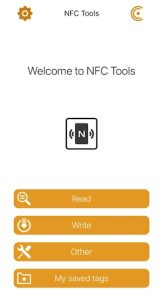
- Select ‘Add a Record’ button.
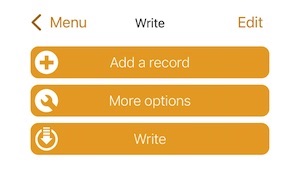
- Scroll and select the option that best suits your needs for the NFC tag.
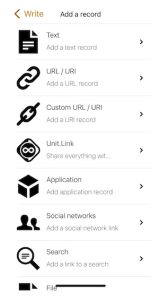
- Click one of the options below to complete the remaining setup steps.
[/et_pb_text][et_pb_toggle title=”Share a URL” open_toggle_text_color=”#ec008c” open_toggle_background_color=”#333333″ closed_toggle_text_color=”#FFFFFF” closed_toggle_background_color=”#333333″ icon_color=”#ec008c” toggle_icon=”||fa||900″ open_icon_color=”#ec008c” open_toggle_icon=”||fa||900″ _builder_version=”4.21.0″ _module_preset=”default” title_text_color=”#FFFFFF” title_level=”h3″ title_font=”|||on|||||” title_text_align=”left” title_font_size=”15px” closed_title_font=”|||on|||||” closed_title_text_align=”left” body_text_color=”#FFFFFF” background_color=”#333333″ text_orientation=”left” custom_margin=”0px||||false|false” custom_margin_tablet=”0px||||false|false” custom_margin_phone=”0px||||false|false” custom_margin_last_edited=”on|phone” global_colors_info=”{}”]
- Select ‘URL / URI’ button.
- Paste your link in the box and click ‘OK’.
- Click ‘Write’ button.
Congratulations, your NFC tag is ready to use! Just tap the top of your phone to the tag to initiate the process and follow any prompts on your phone.
[/et_pb_toggle][et_pb_toggle title=”Share a Custom URL” open_toggle_text_color=”#ec008c” open_toggle_background_color=”#333333″ closed_toggle_text_color=”#FFFFFF” closed_toggle_background_color=”#333333″ icon_color=”#ec008c” toggle_icon=”||fa||900″ open_icon_color=”#ec008c” open_toggle_icon=”||fa||900″ _builder_version=”4.21.0″ _module_preset=”default” title_text_color=”#FFFFFF” title_level=”h3″ title_font=”|||on|||||” title_text_align=”left” title_font_size=”15px” closed_title_font=”|||on|||||” closed_title_text_align=”left” body_text_color=”#FFFFFF” background_color=”#333333″ text_orientation=”left” custom_margin=”0px||||false|false” custom_margin_tablet=”0px||||false|false” custom_margin_phone=”0px||||false|false” custom_margin_last_edited=”on|phone” global_colors_info=”{}”]
- Select ‘Custom URL / URI’ button.
- Paste your custom link in the box and click ‘OK’.
- Click ‘Write’ button.
Congratulations, your NFC tag is ready to use! Just tap the top of your phone to the tag to initiate the process and follow any prompts on your phone.
[/et_pb_toggle][et_pb_toggle title=”Launch Social Network Account” open_toggle_text_color=”#ec008c” open_toggle_background_color=”#333333″ closed_toggle_text_color=”#FFFFFF” closed_toggle_background_color=”#333333″ icon_color=”#ec008c” toggle_icon=”||fa||900″ open_icon_color=”#ec008c” open_toggle_icon=”||fa||900″ _builder_version=”4.21.0″ _module_preset=”default” title_text_color=”#FFFFFF” title_level=”h3″ title_font=”|||on|||||” title_text_align=”left” title_font_size=”15px” closed_title_font=”|||on|||||” closed_title_text_align=”left” body_text_color=”#FFFFFF” background_color=”#333333″ text_orientation=”left” custom_margin=”0px||||false|false” custom_margin_tablet=”0px||||false|false” custom_margin_phone=”0px||||false|false” custom_margin_last_edited=”on|phone” global_colors_info=”{}”]
- Select ‘Social networks’ button.
- Select the social network platform, by clicking the edit button. Paste your username in the box and click ‘OK’.
- Click ‘Write’ button.
Congratulations, your NFC tag is ready to use! Just tap the top of your phone to the tag to initiate the process and follow any prompts on your phone.
[/et_pb_toggle][et_pb_toggle title=”Send Emails” open_toggle_text_color=”#ec008c” open_toggle_background_color=”#333333″ closed_toggle_text_color=”#FFFFFF” closed_toggle_background_color=”#333333″ icon_color=”#ec008c” toggle_icon=”||fa||900″ open_icon_color=”#ec008c” open_toggle_icon=”||fa||900″ _builder_version=”4.21.0″ _module_preset=”default” title_text_color=”#FFFFFF” title_level=”h3″ title_font=”|||on|||||” title_text_align=”left” title_font_size=”15px” closed_title_font=”|||on|||||” closed_title_text_align=”left” body_text_color=”#FFFFFF” background_color=”#333333″ text_orientation=”left” custom_margin=”0px||||false|false” custom_margin_tablet=”0px||||false|false” custom_margin_phone=”0px||||false|false” custom_margin_last_edited=”on|phone” global_colors_info=”{}”]
- Select ‘Mail’ button.
- Enter an email address, subject line, and message into the fields provided. Click ‘OK’.
- Click ‘Write’ button.
Congratulations, your NFC tag is ready to use! Just tap the top of your phone to the tag to initiate the process and follow any prompts on your phone.
[/et_pb_toggle][et_pb_toggle title=”Share Your Contact Information” open_toggle_text_color=”#ec008c” open_toggle_background_color=”#333333″ closed_toggle_text_color=”#FFFFFF” closed_toggle_background_color=”#333333″ icon_color=”#ec008c” toggle_icon=”||fa||900″ open_icon_color=”#ec008c” open_toggle_icon=”||fa||900″ _builder_version=”4.21.0″ _module_preset=”default” title_text_color=”#FFFFFF” title_level=”h3″ title_font=”|||on|||||” title_text_align=”left” title_font_size=”15px” closed_title_font=”|||on|||||” closed_title_text_align=”left” body_text_color=”#FFFFFF” background_color=”#333333″ text_orientation=”left” custom_margin=”0px||||false|false” custom_margin_tablet=”0px||||false|false” custom_margin_phone=”0px||||false|false” custom_margin_last_edited=”on|phone” global_colors_info=”{}”]
- Select ‘Contact’ button.
- Enter your name, and any additional information you would like to share into the fields provided. Click ‘OK’.
- Click ‘Write’ button.
Congratulations, your NFC tag is ready to use! Just tap the top of your phone to the tag to initiate the process and follow any prompts on your phone.
[/et_pb_toggle][et_pb_toggle title=”Share an Address” open_toggle_text_color=”#ec008c” open_toggle_background_color=”#333333″ closed_toggle_text_color=”#FFFFFF” closed_toggle_background_color=”#333333″ icon_color=”#ec008c” toggle_icon=”||fa||900″ open_icon_color=”#ec008c” open_toggle_icon=”||fa||900″ _builder_version=”4.21.0″ _module_preset=”default” title_text_color=”#FFFFFF” title_level=”h3″ title_font=”|||on|||||” title_text_align=”left” title_font_size=”15px” closed_title_font=”|||on|||||” closed_title_text_align=”left” body_text_color=”#FFFFFF” background_color=”#333333″ text_orientation=”left” custom_margin=”0px||||false|false” custom_margin_tablet=”0px||||false|false” custom_margin_phone=”0px||||false|false” custom_margin_last_edited=”on|phone” global_colors_info=”{}”]
- Select ‘Address’ button.
- Enter the address and select which map application you would like to open the address. Click ‘OK’.
- Click ‘Write’ button.
Congratulations, your NFC tag is ready to use! Just tap the top of your phone to the tag to initiate the process and follow any prompts on your phone.
[/et_pb_toggle][et_pb_toggle title=”Connect to Wifi Network” open_toggle_text_color=”#ec008c” open_toggle_background_color=”#333333″ closed_toggle_text_color=”#FFFFFF” closed_toggle_background_color=”#333333″ icon_color=”#ec008c” toggle_icon=”||fa||900″ open_icon_color=”#ec008c” open_toggle_icon=”||fa||900″ _builder_version=”4.21.0″ _module_preset=”default” title_text_color=”#FFFFFF” title_level=”h3″ title_font=”|||on|||||” title_text_align=”left” title_font_size=”15px” closed_title_font=”|||on|||||” closed_title_text_align=”left” body_text_color=”#FFFFFF” background_color=”#333333″ text_orientation=”left” custom_margin=”0px||||false|false” custom_margin_tablet=”0px||||false|false” custom_margin_phone=”0px||||false|false” custom_margin_last_edited=”on|phone” global_colors_info=”{}”]
- Select ‘Wi-Fi network’ button.
- Select type authentication type, encryption details (if any), and the network name and password in the fields provided. Click ‘OK’.
- Click ‘Write’ button.
Congratulations, your NFC tag is ready to use! Just tap the top of your phone to the tag to initiate the process and follow any prompts on your phone.
[/et_pb_toggle][et_pb_button button_url=”https://trailblazecreative.trailblazewebsites.com/our-work-impact/case-studies/” button_text=”View our Case Studies” button_alignment=”left” disabled_on=”on|on|on” module_id=”how-we-add-value” module_class=”white-branded-button” _builder_version=”4.21.0″ _module_preset=”default” custom_button=”on” button_text_size=”14px” button_text_color=”gcid-f2f72532-2473-4256-973e-134f95297a66″ button_bg_color=”RGBA(255,255,255,0)” button_border_width=”1px” button_border_color=”#333333″ button_border_radius=”0px” button_icon=”$||divi||400″ custom_margin=”|0px||0px|false|false” custom_css_main_element=”border: solid 1px white;” disabled=”on” locked=”off” global_colors_info=”{%22gcid-f2f72532-2473-4256-973e-134f95297a66%22:%91%22button_text_color%22%93}” button_border_width__hover_enabled=”on|hover” button_border_width__hover=”1px” button_border_color__hover_enabled=”on|hover” button_border_color__hover=”#FFFFFF”][/et_pb_button][/et_pb_column][/et_pb_row][/et_pb_section][et_pb_section fb_built=”1″ _builder_version=”4.21.0″ _module_preset=”default” background_color=”RGBA(255,255,255,0)” background_image=”https://trailblazecreative.trailblazewebsites.com/wp-content/uploads/2024/04/Untitled-design-2024-04-19T152740.835-scaled.jpg” background_position=”bottom_center” global_colors_info=”{}” global_module=”6017″ theme_builder_area=”post_content”][et_pb_row column_structure=”1_3,2_3″ _builder_version=”4.21.0″ _module_preset=”default” width=”100%” custom_margin=”100px||-65px||false|false” locked=”off” global_colors_info=”{}” theme_builder_area=”post_content”][et_pb_column type=”1_3″ _builder_version=”4.20.4″ _module_preset=”default” global_colors_info=”{}” theme_builder_area=”post_content”][/et_pb_column][et_pb_column type=”2_3″ _builder_version=”4.20.4″ _module_preset=”default” global_colors_info=”{}” theme_builder_area=”post_content”][et_pb_image src=”https://trailblazecreative.trailblazewebsites.com/wp-content/uploads/2024/03/Trek-Outside-Light-Grey-Logo.png” title_text=”Trek Outside – Light Grey Logo” align=”right” _builder_version=”4.21.0″ _module_preset=”default” width=”89.1%” custom_margin=”||-26px||false|false” custom_padding=”|||95px||” global_colors_info=”{}” theme_builder_area=”post_content”][/et_pb_image][/et_pb_column][/et_pb_row][/et_pb_section][et_pb_section fb_built=”1″ module_class=”above-topo” _builder_version=”4.20.4″ _module_preset=”default” background_color=”#000000″ background_image=”https://trailblazecreative.trailblazewebsites.com/wp-content/uploads/2023/01/shutterstock_4280602781.png” parallax=”on” width_tablet=”” width_phone=”” width_last_edited=”on|desktop” min_height_tablet=”” min_height_phone=”” min_height_last_edited=”on|desktop” custom_padding=”||||true|false” custom_css_main_element=”background-color: rgba(0, 0, 0, 0.9);” global_module=”403″ saved_tabs=”all” global_colors_info=”{}”][et_pb_row column_structure=”1_2,1_4,1_4″ disabled_on=”on|on|off” _builder_version=”4.21.0″ _module_preset=”default” background_enable_color=”off” global_colors_info=”{}”][et_pb_column type=”1_2″ _builder_version=”4.18.0″ _module_preset=”default” global_colors_info=”{}”][et_pb_text _builder_version=”4.18.0″ _module_preset=”default” text_text_color=”#FFFFFF” text_font_size=”30px” header_3_text_color=”#FFFFFF” header_3_font_size=”40px” custom_margin=”70px||16px|||” global_colors_info=”{}”]
= > ÷
[/et_pb_text][et_pb_text _builder_version=”4.20.0″ _module_preset=”default” text_text_color=”#FFFFFF” global_colors_info=”{}”]
TrailBlaze believes actions and opportunities that create equity are critical to developing a society without division. Vibrant communities develop more efficiently and sustainably when division is acknowledged and reduced. We offer this perspective in every project we do.
[/et_pb_text][/et_pb_column][et_pb_column type=”1_4″ _builder_version=”4.18.0″ _module_preset=”default” global_colors_info=”{}”][et_pb_image src=”https://trailblazecreative.trailblazewebsites.com/wp-content/uploads/2022/09/Frame-14.png” alt=”TrailBlaze Creative” title_text=”TrailBlaze Creative” url=”https://trailblazecreative.trailblazewebsites.com/” _builder_version=”4.21.0″ _module_preset=”default” width=”106.3%” custom_margin=”|||16px|false|false” global_colors_info=”{}”][/et_pb_image][et_pb_text module_class=”footer-contact-info” _builder_version=”4.21.0″ _module_preset=”default” text_text_color=”#FFFFFF” module_alignment=”center” custom_margin=”16px|||16px|false|false” custom_padding=”29px|||30px|false|false” custom_css_main_element=”word-wrap:normal;” global_colors_info=”{}”]
TrailBlaze Creative
350 Towne Square Way, #97930
Pittsburgh, PA 15227
412-566-TREK (8735)
info@trailblazecreative.trailblazewebsites.com
[/et_pb_text][/et_pb_column][et_pb_column type=”1_4″ _builder_version=”4.18.0″ _module_preset=”default” global_colors_info=”{}”][et_pb_image src=”https://trailblazecreative.trailblazewebsites.com/wp-content/uploads/2023/05/Untitled-design-7-1.png” title_text=”image 37″ url=”https://disabilityin.org/” align=”center” _builder_version=”4.21.0″ _module_preset=”default” custom_margin=”100px|50px||50px|false|false” global_colors_info=”{}”][/et_pb_image][et_pb_image src=”https://trailblazecreative.trailblazewebsites.com/wp-content/uploads/2022/09/image-37.png” title_text=”image 37″ url=”https://trailblazecreative.trailblazewebsites.com/index.php/climate-positive-website” align=”right” disabled_on=”on|on|on” _builder_version=”4.21.0″ _module_preset=”default” custom_margin=”20px||||false|false” disabled=”on” global_colors_info=”{}”][/et_pb_image][/et_pb_column][/et_pb_row][et_pb_row disabled_on=”off|off|on” _builder_version=”4.21.0″ _module_preset=”default” global_colors_info=”{}”][et_pb_column type=”4_4″ _builder_version=”4.18.0″ _module_preset=”default” global_colors_info=”{}”][et_pb_text _builder_version=”4.18.0″ _module_preset=”default” text_text_color=”#FFFFFF” text_font_size=”30px” header_3_text_color=”#FFFFFF” header_3_font_size=”40px” custom_margin=”||||false|false” global_colors_info=”{}”]
= > ÷
[/et_pb_text][et_pb_text _builder_version=”4.20.0″ _module_preset=”default” text_text_color=”#FFFFFF” global_colors_info=”{}”]
TrailBlaze believes actions and opportunities that create equity are critical to developing a society without division. Vibrant communities develop more efficiently and sustainably when division is reduced. We offer this perspective in every project we do.
[/et_pb_text][et_pb_image src=”https://trailblazecreative.trailblazewebsites.com/wp-content/uploads/2022/09/Frame-14.png” alt=”TrailBlaze Creative” title_text=”TrailBlaze Creative” url=”https://trailblazecreative.trailblazewebsites.com/” _builder_version=”4.20.4″ _module_preset=”default” max_width=”400px” custom_margin=”|||-21px|false|false” custom_margin_tablet=”” custom_margin_phone=”|||-17px|false|false” custom_margin_last_edited=”on|phone” global_colors_info=”{}”][/et_pb_image][et_pb_blog include_categories=”28″ show_author=”off” show_date=”off” show_categories=”off” disabled_on=”on|on|on” module_class=”news-homepage” _builder_version=”4.20.0″ _module_preset=”default” header_level=”h3″ header_font=”Helvetica Neue – BOLD||||||||” body_font=”Helvetica Neue – Regular||||||||” background_layout=”dark” custom_css_featured_image=”max-width: 150px;” disabled=”on” global_colors_info=”{}” custom_css_featured_image_last_edited=”on|tablet” custom_css_featured_image_tablet=”max-width: 150px;” custom_css_featured_image_phone=”max-width: 150px;”][/et_pb_blog][et_pb_text module_class=”footer-contact-info” _builder_version=”4.21.0″ _module_preset=”default” text_text_color=”#FFFFFF” module_alignment=”center” custom_margin=”20px||||false|false” custom_padding=”36px|||||” global_colors_info=”{}”]
TrailBlaze Creative
350 Towne Square Way, #97930
Pittsburgh, PA 15227
412-566-8735
info@trailblazecreative.trailblazewebsites.com
[/et_pb_text][et_pb_image src=”https://trailblazecreative.trailblazewebsites.com/wp-content/uploads/2022/09/image-37.png” title_text=”image 37″ disabled_on=”on|on|on” _builder_version=”4.21.0″ _module_preset=”default” custom_margin=”||||false|false” disabled=”on” global_colors_info=”{}”][/et_pb_image][et_pb_social_media_follow use_icon_font_size=”on” _builder_version=”4.18.0″ _module_preset=”default” text_orientation=”left” module_alignment=”center” custom_margin=”||||false|false” custom_padding=”|||11px|false|false” border_radii=”on|0px|0px|0px|0px” global_colors_info=”{}”][et_pb_social_media_follow_network social_network=”facebook” url=”https://www.facebook.com/TrekOutside/” _builder_version=”4.18.0″ _module_preset=”default” background_color=”rgba(255,255,255,0.34)” background_enable_color=”on” global_colors_info=”{}” background__hover_enabled=”on|hover” background_color__hover=”#ec008c” background_enable_color__hover=”on” follow_button=”off” url_new_window=”on”]facebook[/et_pb_social_media_follow_network][et_pb_social_media_follow_network social_network=”twitter” url=”https://twitter.com/trekoutside” _builder_version=”4.18.0″ _module_preset=”default” background_color=”rgba(255,255,255,0.34)” background_enable_color=”on” global_colors_info=”{}” background__hover_enabled=”on|hover” background_color__hover=”#ec008c” background_enable_color__hover=”on” follow_button=”off” url_new_window=”on”]twitter[/et_pb_social_media_follow_network][et_pb_social_media_follow_network social_network=”instagram” url=”https://www.instagram.com/trekoutside/” _builder_version=”4.18.0″ _module_preset=”default” background_color=”rgba(255,255,255,0.34)” background_enable_color=”on” global_colors_info=”{}” background__hover_enabled=”on|hover” background_color__hover=”#ec008c” background_enable_color__hover=”on” follow_button=”off” url_new_window=”on”]instagram[/et_pb_social_media_follow_network][/et_pb_social_media_follow][/et_pb_column][/et_pb_row][/et_pb_section]